
Maximizing Cost-Efficient Performance: Best Practices for Scaling Data Warehouses in Snowflake

Maximizing Cost-Efficient Performance: Best Practices for Scaling Data Warehouses in Snowflake
Overview of Warehouses
Sizes of the warehouse
Warehouse Size | Credits / Hour | Credits / Second | Notes |
X-Small | 1 | 0.0003 | Default size for warehouses created in Snowsight and using CREATE WAREHOUSE. |
Small | 2 | 0.0006 | |
Medium | 4 | 0.0011 | |
Large | 8 | 0.0022 | |
X-Large | 16 | 0.0044 | Default size for warehouses created using the Classic Console. |
2X-Large | 32 | 0.0089 | |
3X-Large | 64 | 0.0178 | |
4X-Large | 128 | 0.0356 | |
5X-Large | 256 | 0.0711 | Generally available in Amazon Web Services (AWS) and Microsoft Azure regions, and in preview in US Government regions. |
6X-Large | 512 | 0.1422 | Generally available in Amazon Web Services (AWS) and Microsoft Azure regions, and in preview in US Government regions. |
Create Warehouse
Establishes a new virtual warehouse within the system.
The initial establishment of a virtual warehouse may need some time to allocate the computational resources, unless the warehouse is constructed in a SUSPENDED state from the outset.
This command accommodates the subsequent variants:
CREATE OR ALTER WAREHOUSE: Establishes a new warehouse if absent or modifies an existing warehouse.
					CREATE [ OR REPLACE ] WAREHOUSE [ IF NOT EXISTS ] <name>
       [ [ WITH ] objectProperties ]
       [ [ WITH ] TAG ( <tag_name> = '<tag_value>' [ , <tag_name> = '<tag_value>' , ... ] ) ]
       [ objectParams ]
</tag_value></tag_name></tag_value></tag_name></name>
					objectProperties ::=
  WAREHOUSE_TYPE = { STANDARD | 'SNOWPARK-OPTIMIZED' }
  WAREHOUSE_SIZE = { XSMALL | SMALL | MEDIUM | LARGE | XLARGE | XXLARGE | XXXLARGE | X4LARGE | X5LARGE | X6LARGE }
  RESOURCE_CONSTRAINT = { MEMORY_1X | MEMORY_1X_x86 | MEMORY_16X | MEMORY_16X_x86 | MEMORY_64X | MEMORY_64X_x86 }
  MAX_CLUSTER_COUNT = <num>
  MIN_CLUSTER_COUNT = <num>
  SCALING_POLICY = { STANDARD | ECONOMY }
  AUTO_SUSPEND = { <num> | NULL }
  AUTO_RESUME = { TRUE | FALSE }
  INITIALLY_SUSPENDED = { TRUE | FALSE }
  RESOURCE_MONITOR = <monitor_name>
  COMMENT = '<string_literal>'
  ENABLE_QUERY_ACCELERATION = { TRUE | FALSE }
  QUERY_ACCELERATION_MAX_SCALE_FACTOR = <num>
</num></string_literal></monitor_name></num></num></num>
					objectParams ::=
  MAX_CONCURRENCY_LEVEL = <num>
  STATEMENT_QUEUED_TIMEOUT_IN_SECONDS = <num>
  STATEMENT_TIMEOUT_IN_SECONDS = <num>
</num></num></num>
Variant Syntax -
Create or Alter Warehouse
Establishes a new warehouse if it is nonexistent, or modifies an existing warehouse to conform to the specifications provided in the statement. A CREATE OR ALTER WAREHOUSE statement adheres to the syntactic requirements of a CREATE WAREHOUSE statement and is subject to the same constraints as an ALTER WAREHOUSE statement.
The subsequent alterations are permissible when modifying a warehouse:
Modifying warehouse attributes and specifications. For instance, WAREHOUSE_TYPE, AUTO_RESUME, or MAX_CLUSTER_COUNT.
					CREATE OR ALTER WAREHOUSE <name>
     [ [ WITH ] objectProperties ]
     [ objectParams ]

objectProperties ::=
  WAREHOUSE_TYPE = { STANDARD | 'SNOWPARK-OPTIMIZED' }
  WAREHOUSE_SIZE = { XSMALL | SMALL | MEDIUM | LARGE | XLARGE | XXLARGE | XXXLARGE | X4LARGE | X5LARGE | X6LARGE }
  MAX_CLUSTER_COUNT = <num>
  MIN_CLUSTER_COUNT = <num>
  SCALING_POLICY = { STANDARD | ECONOMY }
  AUTO_SUSPEND = { <num> | NULL }
  AUTO_RESUME = { TRUE | FALSE }
  INITIALLY_SUSPENDED = { TRUE | FALSE }
  RESOURCE_MONITOR = <monitor_name>
  COMMENT = '<string_literal>'
  ENABLE_QUERY_ACCELERATION = { TRUE | FALSE }
  QUERY_ACCELERATION_MAX_SCALE_FACTOR = <num>

objectParams ::=
  MAX_CONCURRENCY_LEVEL = <num>
  STATEMENT_QUEUED_TIMEOUT_IN_SECONDS = <num>
  STATEMENT_TIMEOUT_IN_SECONDS = <num>
</num></num></num></num></string_literal></monitor_name></num></num></num></name>
Understanding Snowflake’s Scalability Feature
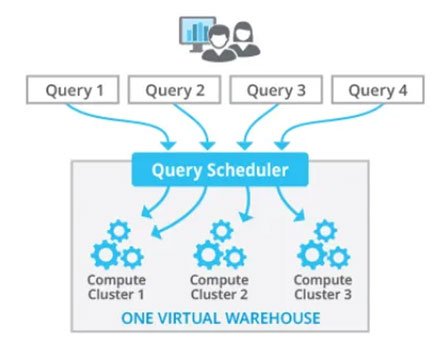
A scaling policy in Snowflake is a feature that enables automated adjustment of virtual warehouse size according to established parameters. Virtual warehouses in Snowflake are computational clusters utilized for executing SQL queries and other database operations. Scaling strategies maximize the performance and cost of your Snowflake system by dynamically altering the warehouse size as required.
Snowflake comprises two types of Virtual Warehouses.
- Single Cluster Warehouse — Minimum Cluster = 1, Maximum Cluster = 1
- Multi-Cluster Warehouse — Minimum Cluster ≥ 1, Maximum Cluster > 1
The Multi-Cluster Warehouse may be operated in two ways once again.
- Maximized Mode — Minimum Cluster = 2, Maximum Cluster = 2
- Autoscale Mode — Minimum Cluster = 1, Maximum Cluster = 2 (Automatically scales up to 2)
Scaling Policy
As seen, Snowflake has two ‘Scaling Policy’ choices. Understand them well.
Standard
Snowflake’s default scaling policy. For credit consumption, this strategy is more costly than ‘Economy’. As expected, it performs better. This strategy aims to reduce query queues.
If any of these are true, a cluster starts:
- Query queued
OR
- The system discovers an additional query beyond the capacity of the current clusters.
AND
- 20 seconds have passed since the previous cluster started.
If A or B is true, the first cluster starts immediately. A, B, or C must be true for each cluster. Assuming a maximum of 5 clusters, starting all 5 takes at least 80 seconds (one immediately, and 20 seconds between each cluster).
Every minute, the system checks Least Loaded Cluster load. The Least Loaded Cluster is shut down after 2–3 checks whether the system can disperse its load without spinning it up again.
Thus, if you have a spike load for 20 minutes and 1 to 5 clusters, all 5 will be up and operating within 80 seconds. After 1200 seconds, or the spike’s conclusion, clusters will decrease by 1 every 2-3 minutes.
Economy
As the name implies, this approach conserves credits and costs. Thus, queries may queue and take longer to finish. The algorithm spins off new clusters when there is enough workload to keep them active for at least 6 minutes. Thus, the system must queue enough inquiries before initiating a new cluster.
Like the ‘Standard’ Snowflake Scaling Policy, a cluster is stopped by monitoring the load on the least loaded cluster and seeing if the others can manage it. Instead of 2–3 checks, the system does 5–6 checks before shutting down a cluster here. Thus, cluster shutdown takes longer, thus consider this while choosing between ‘Standard’ and ‘Economy’ policies.
The ‘Economy’ Snowflake Scaling Policy saves money during brief surges when load is too low for a second cluster. However, brief to moderate delays and delayed query processing may occur.
Best Practices for Cost-Effective Performance Scaling
Experiment to Optimize Performance
Use Snowflake’s versatile setups to discover the best settings:
Test warehouse sizes with typical inquiries to find the optimal fit for your workload.
Test query complexity and table sizes to see how they affect performance.
Right-Sizing Your Warehouse
Consider these situations when choosing a warehouse size:
Small-scale environments: Test and query with X-Small, Small, Medium sizes.
Large environments: For production workloads and complicated queries, choose Large, X-Large, 2X-Large.
Per-second billing and auto-suspend let you scale up or down, thus avoiding overprovisioning.
Automating Suspension and Resumption
Efficient warehouse management cuts costs:
Allow auto-suspend for inactive warehouses. Most workloads benefit from a 5–10-minute inactivity threshold.
Automate warehouse restarts as queries arrive. This reduces delays and assures availability.
Considerations for Snowsight and Notebook Apps
For Snowflake’s UI (Snowsight), an X-Small warehouse is usually enough, but bigger accounts may need more processing resources. The dedicated warehouse keeps UI queries running efficiently without competing for resources. To save expenses and fragmentation, Snowflake offers a Notebook app default warehouse.
Managing Query Performance
Leverage Warehouse Caching
Caching table data while queries is a warehousing practice. Use the cache for subsequent queries to enhance performance:
Consider the cache when suspending a warehouse. Suspending saves credits but clears the cache, decreasing query speed when restarted.
Query Composition and Load Balancing
Size and structure of searches affect resource usage:
Complex joins and larger tables demand more computational resources.
Homogeneous workloads in one warehouse increase performance and simplify load assessment. Keep basic and sophisticated queries separate in the warehouse.
Cost Management in Snowflake
Snowflake’s per-second pricing assures you only pay for what you use, but cost optimization requires credit charge knowledge.
How Credits Are Charged
Warehouse size: An X-Small warehouse requires 1 credit/hour, whereas a 4X-Large uses 128.
Minimum charging period: Snowflake bills in 60-second increments, thus use sessions’ minimum fee efficiently.
Resizing Warehouses
Snowflake permits live warehouse scaling. Resizing increases resources to manage heavy demand or enhance complicated query performance. However:
Small queries may not benefit from resizing.
Resizing transitions may bill credits for both old and new setups.
Scaling Up vs. Scaling Out
Two scaling options are supported by Snowflake:
Scaling Up: Add warehouse space for greater computational power.
Scaling Out: Add clusters to an Enterprise Edition or higher multi-cluster warehouse for concurrent query processing.
When to Scale Up
Handling resource-intensive requests.
Reduce computing power-related queueing.
When to Scale Out
Concurrent workloads with many queries competing for resources.
Large accounts need numerous clusters to avoid congestion.
Optimizing for Data Loading and Query Testing
Data Loading Considerations
File count and size determine data loading warehouse size. Take into account predicted throughput.
Query Testing Recommendations
Run queries on different warehouse sizes to assess performance. Select 5–10-minute searches for consistent benchmarks.
Summary of Key Tips
- Experiment: Test different configurations to optimize performance and cost.
- Right Size: Match warehouse size to workload requirements; larger isn’t always better.
- Automate: Use auto-suspend and auto-resume to minimize costs while ensuring availability.
- Monitor Usage: Regularly review credit consumption and adjust configurations as needed.
- Balance Workloads: Run similar queries on the same warehouse to maintain efficiency.
Conclusion
Scaling data warehouses in Snowflake encompasses both scientific principles and artistic nuances. Utilizing its sophisticated scalability attributes, automating scaling protocols, refining queries, and employing monitoring instruments enables the attainment of cost-effective performance without sacrificing efficiency. Regardless of whether you are overseeing variable workloads or strategizing for sustained expansion, these optimal methods will assist you in maximizing your Snowflake investment.


How LLMs Are Revolutionizing Text Mining and Data Extraction from Unstructured Data

How Businesses Use LLMs for Competitive Intelligence to Stay Ahead of the Curve

Maximizing Cost-Efficient Performance: Best Practices for Scaling Data Warehouses in Snowflake

Implementing Snowflake Data Governance for Scalable Data Security